
Views: 0 Author: Site Editor Publish Time: 2026-06-09 Origin: Site


Imagine stepping onto a stage, delivering a powerful opening line, only to realize nobody heard it. Poor sound quality or sudden dropouts can immediately undermine your credibility. An unstable audio signal distracts your audience regardless of how brilliant your presentation content might be. We currently navigate hybrid work environments every day. Crisp, clear audio is mandatory for in-room amplification and virtual streaming simultaneously. You need robust equipment to bridge this physical and digital gap. Choosing the right Wireless Microphone requires a delicate balance. You must weigh physical form factor preferences against frequency reliability and overall venue compatibility. This guide will walk you through the essential technical criteria to help you select the perfect system. You will learn how to protect your next keynote from disastrous audio failures and ensure your message translates perfectly.
Form Factor Dictates Mobility: Lavaliers offer discretion, headsets ensure consistent audio levels, and handhelds are best for Q&A and multiple speakers.
Frequency Matters: 2.4GHz systems are plug-and-play but vulnerable to Wi-Fi interference; UHF systems offer better range and stability for large venues but require compliance with local spectrum regulations.
Reliability Over Range: Advertised ranges are often tested in ideal line-of-sight conditions; real-world purchasing decisions should prioritize signal stability and battery consistency over maximum distance.
Setup Realities: Even premium microphones fail without proper receiver placement and gain staging.
You cannot identify the perfect audio equipment without first defining your exact usage scenario. Success criteria vary wildly from one event to the next. The best microphone depends entirely on room size, presentation style, and technical support availability. A static presenter standing behind a lectern requires vastly different gear than an energetic motivational speaker pacing across an auditorium stage. You must map your hardware choices to your actual behavior on stage.
You must also navigate the mobility versus quality trade-off. Sound quality improves dramatically when you place a microphone capsule closer to your mouth. This proximity increases the signal-to-noise ratio. A high signal-to-noise ratio naturally rejects unwanted room echo and audience murmur. However, dynamic movement restricts certain microphone choices. If you frequently gesture or use interactive props, you cannot afford to hold a heavy device in your hand. You must decide if absolute audio fidelity outweighs the comfort of hands-free movement.
System compatibility represents the final pillar of your audio needs. You must match the receiver's output to the existing venue infrastructure. Professional public address (PA) systems usually require balanced XLR connections. Conversely, a simple corporate webinar setup might only accept a 3.5mm analog jack or a digital USB connection. Never assume a venue will have the correct adapters waiting for you. You must verify compatibility during the planning phase to avoid last-minute panic.
Microphone form factors directly dictate your comfort and your audience's experience. You must select a category that aligns with your wardrobe, movement habits, and presentation format.
Lavalier microphones clip directly onto your clothing. They remain a staple in modern corporate environments.
Best for: Corporate keynotes, panel moderators, and video-recorded presentations.
Pros: They are incredibly discreet and maintain a professional appearance. They leave your hands completely free to operate slide clickers or demonstrate products.
Cons: They are notoriously prone to clothing rustle. If you wear layered clothing or jewelry, fabric friction will ruin your audio. Furthermore, volume drops significantly if you turn your head sharply away from the microphone capsule.
Headsets wrap around your ears and place a tiny capsule right beside your cheek.
Best for: Active presenters, theatrical stage setups, fitness instructors, and TED-style talks.
Pros: They guarantee a consistent distance from your mouth at all times. This ensures flawless volume levels even when you look at a projection screen. The close placement aggressively rejects background noise.
Cons: They are highly visible. Some users find them uncomfortable during multi-hour sessions. They can also physically interfere with eyeglasses or large earrings.
The traditional handheld transmitter remains the most versatile tool in live production.
Best for: Panel discussions, rapid audience Q&A sessions, and dynamic stage setups involving multiple guests.
Pros: They offer immediate tactile mute control. You can easily pass them between multiple speakers. They feature highly durable construction built for touring and rough handling.
Cons: Using one permanently ties up one of your hands. They also require proper microphone technique from the user. Holding it too far away or pointing it downward destroys the audio capture.
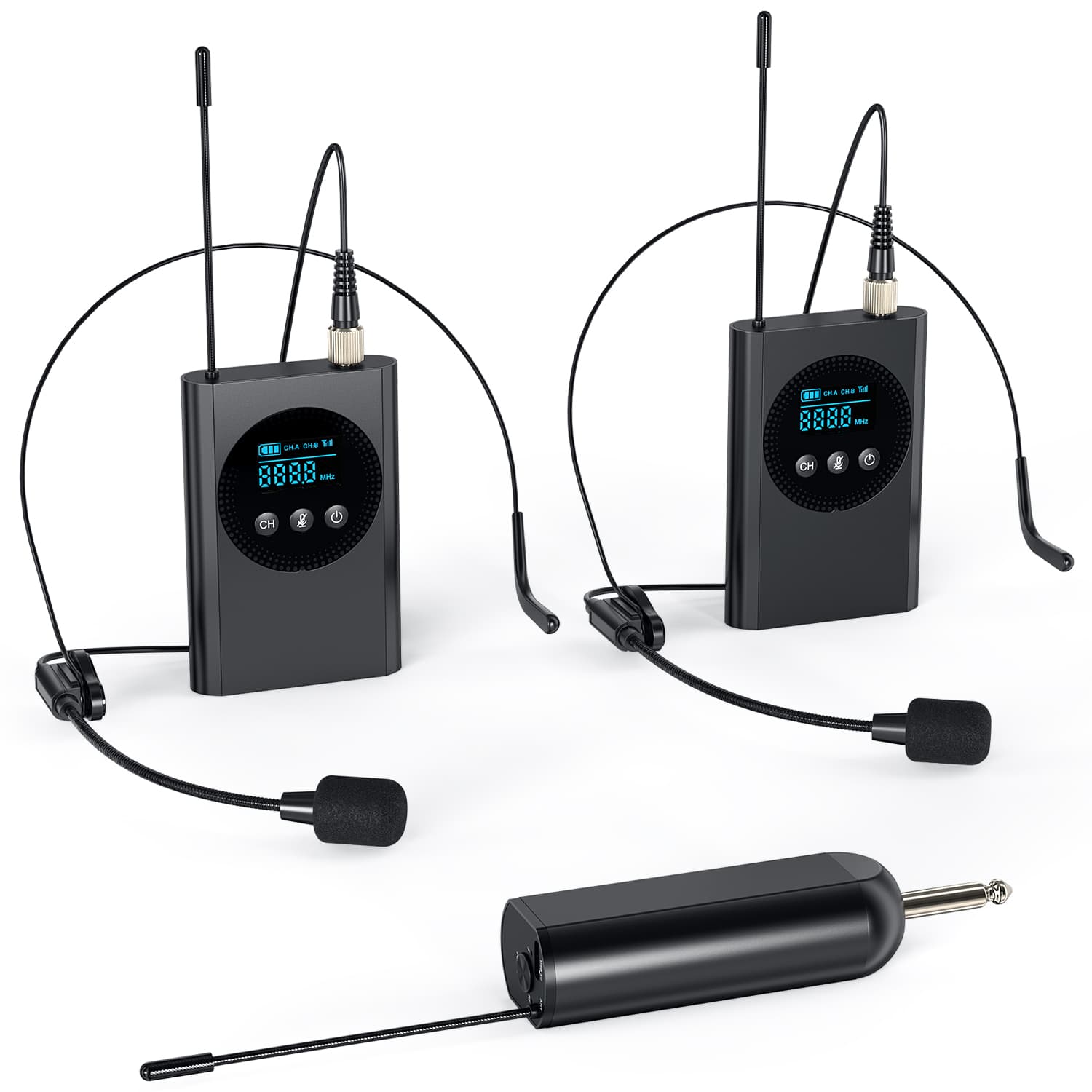
Beyond physical shape, the internal technology drives your overall reliability. You must understand radio frequency behavior and battery chemistry to ensure your Wireless Microphone survives the duration of your event.
The frequency band dictates how your signal travels through the air. You generally choose between 2.4GHz digital systems and Ultra High Frequency (UHF) analog/digital systems.
2.4GHz Systems are incredibly popular for content creators. They are globally compliant, meaning you can travel internationally without worrying about local spectrum laws. They work flawlessly in small rooms or controlled studios. Risk: They operate in the exact same frequency band as Wi-Fi routers and Bluetooth devices. They become highly susceptible to catastrophic interference in convention centers crowded with thousands of smartphones.
UHF Systems provide professional-grade stability. UHF waves are longer, allowing them to penetrate obstacles like human bodies and staging walls much better than 2.4GHz signals. Risk: You must actively scan for clean channels upon arrival. You must also verify your equipment complies with local regulations (like FCC Part 74 in the US) to avoid transmitting on illegal, reserved emergency bands.
System Type | Wavelength Behavior | Interference Risk Level | Ideal Operating Environment |
|---|---|---|---|
2.4GHz Digital | Short waves; requires strict line-of-sight. | High (Competes with Wi-Fi/Smartphones). | Small meeting rooms, solo video shoots. |
UHF Analog/Digital | Long waves; easily passes through soft obstacles. | Low (Assuming proper channel scanning). | Large auditoriums, crowded trade shows. |
Power failure stops a presentation instantly. You must evaluate the battery ecosystem. Many modern compact systems use built-in lithium-ion batteries. These are highly convenient and charge via USB-C. However, their total capacity degrades over years of use. If a built-in battery dies mid-presentation, you cannot swap it. Professional systems still rely heavily on replaceable AA batteries. Keeping fresh alkaline or rechargeable AAs on hand provides a fail-safe solution for long, multi-day conferences.
Digital conversion takes time. This processing delay is called latency. For live sound amplification over a PA system, acceptable latency thresholds must stay under 10 milliseconds (<10ms). If latency creeps higher, presenters hear a distracting echo of their own voice bouncing back from the room speakers. This echo disrupts speech pacing. Ensure your chosen system specifies ultra-low latency suitable for live public address applications.
Different venues demand different hardware tiers. Avoid exaggerated marketing claims regarding range. Instead, focus on verifiable specifications, historical reliability, and industry-standard adoption.
When presenting to thousands, failure is not an option. Industry standards like the Shure QLX-D or Sennheiser Evolution Wireless Digital (EW-DX) series dominate this space.
Why it wins: They provide unmatched RF stability in hostile environments. They use advanced digital encryption and predictive switching diversity to prevent signal drops. They are infinitely scalable, allowing audio engineers to run dozens of simultaneous speakers without overlapping frequencies. They also include strict compliance features tailored to regional spectrum laws.
Independent speakers often travel alone and act as their own AV team. Compact 2.4GHz systems like the Rode Wireless PRO or DJI Mic 2 excel here.
Why it wins: They offer true zero-configuration setup. You simply turn them on, and they pair instantly. Many premium models in this tier now feature onboard backup recording. If wireless interference ruins your live transmission, the transmitter unit itself saves a flawless audio file locally. They are highly portable and fit easily into a laptop bag.
Fixed boardroom installations require predictable, foolproof operation. Systems like the Shure Microflex Advance or Sennheiser SpeechLine Digital Wireless bridge this gap perfectly.
Why it wins: These mid-tier digital/UHF hybrid solutions integrate easily with standard AV carts and corporate network infrastructure. They balance ease-of-use with robust interference protection. They often feature automatic frequency management, silently changing channels in the background if they detect incoming interference. Users never have to manually push scanning buttons.
Purchasing premium hardware does not guarantee perfect audio. User error and poor physical placement ruin presentations more frequently than hardware failure. You must actively mitigate these common implementation risks.
Line-of-Sight Degradation: You must respect radio frequency physics. Human bodies consist mostly of water, and water absorbs RF signals aggressively. Concrete pillars and metal staging frames reflect signals, causing multipath interference. Receivers must be elevated above the audience. Place them strategically at the side of the stage or near the front row to maintain direct visual line-of-sight with the transmitter on your belt.
Gain Staging and Feedback Loops: Improper volume setup causes a terrible screeching sound known as feedback. This risk increases drastically when placing lavaliers too close to PA speakers. You must practice proper gain staging. Set the transmitter sensitivity (gain) high enough to capture your voice clearly, but low enough that room noise does not trigger a feedback loop. Always perform a sound check before the audience enters the room.
The "Mute Button" Trap: Presenters frequently forget to unmute themselves before walking on stage. Conversely, they accidentally turn off transmitters while adjusting their belts. These user-error risks cause awkward silences. Look for systems featuring digital lockout functions. Audio engineers can lock the power and mute switches remotely. This guarantees the microphone stays active exactly when needed, removing the burden from the presenter.
Securing flawless presentation audio requires methodical planning. You must define your exact needs before purchasing gear. Start by evaluating your venue size to determine if you need UHF stability or if 2.4GHz convenience will suffice. Next, select your ideal form factor. Choose a headset for active movement, a lavalier for discreet corporate settings, or a handheld for dynamic panel interactions. Finally, determine your setup requirements based on battery preferences and AV rack compatibility.
Your next steps should involve a thorough equipment audit. Encourage your team to audit current PA system inputs to confirm you have the right connectors. Consult your IT or AV staff to understand local frequency restrictions before making a final purchase. Taking these preventative steps ensures your voice carries authority and your message reaches every listener without distraction.
A: No. Standard Bluetooth microphones introduce unacceptable latency, often exceeding 100 milliseconds. This causes a severe echo effect through live PA systems, disrupting your speech pattern. Additionally, Bluetooth aggressively compresses audio, resulting in poor voice quality. They are strictly designed for consumer phone calls or recorded video, not live professional amplification.
A: This depends entirely on your system's frequency band and processing power. Entry-level 2.4GHz systems often limit out at 4 to 8 simultaneous units before they start interfering with one another. Professional UHF digital systems can reliably scale to dozens or even hundreds of simultaneous channels in a single venue.
A: Generally, no. Most consumer and prosumer usage operates unlicensed under local regulations, such as FCC Part 74 rules in the US. However, you must operate strictly within permitted frequency bands. Certain ranges are legally reserved for emergency services and television broadcasts. Always verify your hardware complies with your specific country's current spectrum laws.
A: Advertised range specifications represent ideal, direct line-of-sight conditions outdoors. Real-world range is severely reduced by physical obstructions. Human bodies, dense walls, and audience members absorb and block radio waves. To prevent dropouts, keep the receiver elevated and ensure an unobstructed path between the transmitter pack and the receiver antennas.


