
Views: 0 Author: Site Editor Publish Time: 2026-06-03 Origin: Site


Audio equipment investments carry high stakes for modern creators and IT buyers alike. Poor audio quality directly degrades audience retention and shatters professional credibility. Listeners quickly forgive grainy video, but they immediately abandon distorted, echoing sound. We must frame the USB versus XLR debate beyond a simplistic argument of good versus bad. You are actually deciding on signal chain architecture, acceptable technical overhead, and long-term hardware scalability. Every workspace demands a distinct approach to capturing voice accurately. This guide delivers a skeptical, evidence-based evaluation framework. We will help you match the right microphone technology to your specific deployment environments and operational needs. You will discover exactly how to eliminate technical bottlenecks before they disrupt your workflow.
USB microphones feature built-in analog-to-digital converters (DAC), prioritizing rapid deployment and plug-and-play simplicity.
XLR microphones rely on an analog signal chain requiring external audio interfaces, offering superior modularity, lower noise floors, and multi-track scalability.
For corporate spaces and huddle rooms, a dedicated USB conference microphone often yields the highest ROI due to minimal IT friction.
Attempting to use multiple USB microphones on a single machine introduces severe driver conflicts; multi-speaker setups almost always necessitate an XLR infrastructure.
Every microphone relies on a fundamental mechanical process to capture sound. Acoustic waves hit a sensitive diaphragm. This impact moves a specialized coil or alters electrical capacitance. The resulting movement generates a distinct electrical signal. Audio professionals call this the analog signal. Understanding how your system handles this signal determines your entire hardware layout.
Analog setups keep this electrical signal intact throughout the entire cable run. The delicate signal leaves the microphone chassis and travels down a balanced three-pin cable. It finally reaches an external, dedicated audio interface. Inside this interface box, a high-quality analog-to-digital converter transforms the physical waveform into pure digital data. Your computer processor then ingests this data for recording or broadcasting.
Digital models take a brilliant internal shortcut. Manufacturers pack the critical preamplifier and the analog-to-digital converter directly into the microphone chassis itself. The device finalizes the conversion process internally. It sends a completed digital signal directly into your computer port. You skip the need for external conversion hardware entirely.
This compact architectural design introduces specific electronic challenges. Internal components in digital models remain highly susceptible to electromagnetic interference. Computer motherboards and power supplies generate significant electrical noise. This physical proximity can introduce a noticeably higher noise floor. Shielded, external analog components operate independently and typically avoid this interference completely.
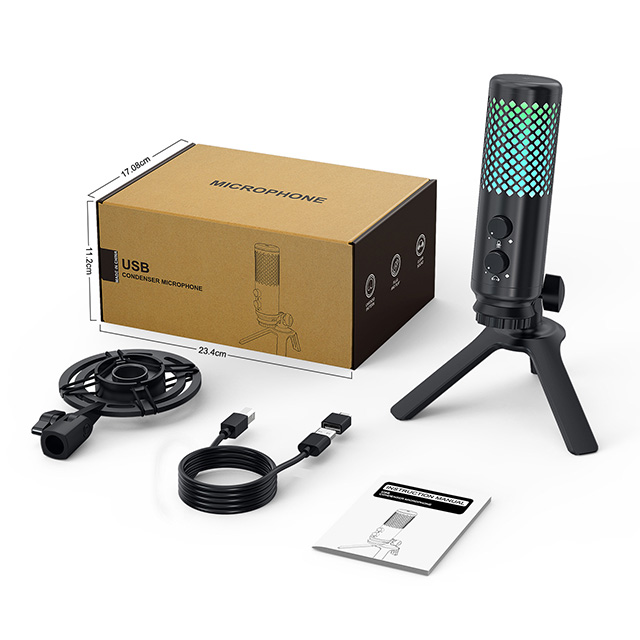
Digital hardware thrives on deployment agility. You bypass cumbersome external hardware chains entirely. Remote workers, solo content creators, and traveling professionals can unbox a device and start recording instantly. You simply plug the cord into your machine. The operating system recognizes the peripheral immediately. This eliminates complex software routing and driver installations.
In team-based organizational environments, technical simplicity becomes paramount. A specialized USB Conference Microphone serves as the definitive standard for modern huddle rooms and boardrooms. These intelligent devices bypass complex routing panels. They integrate natively into UCaaS platforms like Zoom and Microsoft Teams. Deploying them consistently reduces IT support tickets and accelerates meeting start times across the board.
However, this intense convenience carries distinct implementation risks. Operators must understand the limitations of a closed ecosystem. You trade absolute control for immediate usability.
Zero Modularity: Digital systems operate as completely monolithic units. If the internal preamplifier fails or the converter chips malfunction, you cannot swap them out. You must replace the entire microphone unit entirely.
The Multi-Mic Dilemma: Running two digital devices simultaneously creates an aggregate device nightmare. Operating systems struggle aggressively to sync two independent digital clocks. This systemic conflict often causes severe latency, noticeable audio drift, and sudden software crashes.
Gain Management Limitations: Digital gain relies heavily on software controls. Pushing the input volume too high through operating system settings often clips the audio irreversibly. You lack physical analog padding to protect the signal from unexpected loud noises.
Audio engineers consider analog architecture the definitive standard for scalable, high-fidelity applications. This analog pathway delivers uncompromising audio quality. Dedicated, external preamplifiers provide incredibly clean gain. They capture significantly higher dynamic ranges. This expansive range proves indispensable for nuanced voiceover work, loud dynamic vocal performances, and precise Foley recording.
Analog systems offer remarkable future-proofing through true hardware modularity. You build an ecosystem piece by piece. You might upgrade the microphone capsule this year to change your vocal tone. Next year, you could swap the audio interface for superior conversion chips. The remaining components continue working seamlessly together. You rarely need to replace your entire setup at once.
Multi-track capabilities highlight the strongest advantage of an analog setup. Multi-host podcasts and large panel recordings require distinct track isolation. An external interface can process multiple analog inputs simultaneously. You route each speaker to an independent channel. This provides your audio engineer absolute control over volume and equalization during post-production.
This granular control introduces specific implementation challenges:
Hardware Infrastructure Requirements: Setting up an analog chain requires securing multiple discrete components. You need XLR cables, external interfaces, desktop mixers, and sometimes inline preamplifiers for gain-hungry dynamic capsules.
Steeper Learning Curve: You must understand fundamental audio engineering principles. Operators need basic knowledge of gain staging, phantom power allocation, and dedicated audio routing software. Failing to understand these concepts often results in muted channels or severe distortion.
Physical Desk Footprint: External interfaces and heavy-duty cables consume significant physical space. Minimalist desk setups struggle to accommodate the necessary outboard gear required for analog recording.
Your immediate headcount dictates your baseline technology. A simple rule of thumb applies heavily here. One solitary speaker means a digital connection remains perfectly viable. You can manage a single digital input without system instability. If you host two or more speakers in the exact same room, an analog infrastructure becomes strictly mandatory. Attempting a multi-speaker setup on a single computer without a multi-channel interface invites technical disaster.
Your physical room profoundly impacts microphone performance. Analog dynamic capsules excel heavily in untreated rooms. They provide superior off-axis sound rejection, ignoring sounds coming from the sides and rear. Conversely, many popular digital condensers act like aggressive acoustic vacuums. They pick up excessive background noises. You will hear HVAC hums, mechanical keyboard clicks, and outside street traffic clearly in the final recording.
Resource planning differs heavily between these paths. Digital models require a singular upfront commitment. You buy the unit, plug it in, and start working immediately. Analog systems demand distributed investments across multiple hardware pieces. You must budget for interfaces and cables alongside the microphone itself. However, scaling an analog system later often proves more resource-efficient than continuously replacing outdated digital units.
Think critically about your editing pipeline. Analog chains capture raw, uncolored audio signals. This extreme neutrality gives sound engineers much wider latitude during post-production processing. Digital models often apply internal digital signal processing before the computer receives the file. They bake in equalization and compression. You cannot easily reverse these baked-in effects later.
Evaluation Criteria | Digital USB Ecosystem | Analog XLR Ecosystem |
|---|---|---|
Signal Conversion | Internal (Built into microphone) | External (Requires audio interface) |
Deployment Speed | Instant plug-and-play | Requires physical routing and driver setup |
Multi-Speaker Capacity | Poor (Driver conflicts) | Excellent (Discrete track isolation) |
Hardware Modularity | None (All-in-one unit) | High (Swappable interfaces, cables, preamps) |
Ideal Environment | Treated rooms, remote offices, travel | Studios, untreated rooms, multi-host setups |
You must actively align your hardware choices with your primary operational persona. The wrong choice creates endless workflow bottlenecks. Let us break down the definitive shortlisting logic to guide your final decision.
Choose the digital USB pathway if your requirements match these scenarios:
You are outfitting a compact remote workspace or traveling frequently.
You are purchasing a USB Conference Microphone to standardize enterprise team meetings.
You record a solo broadcast with strict limitations on post-production time.
You want zero technical troubleshooting before hitting the record button.
Choose the analog XLR pathway if your goals align with these objectives:
You are engineering a commercial recording studio.
You host regular in-person interviews requiring discrete, isolated audio channels.
You perform professional commercial voiceover work demanding pristine gain.
Your strategy requires distinct multitrack recording and future hardware scaling.
Neither signal path proves inherently superior in a vacuum. Your specific operational environment and distinct scalability needs dictate the absolutely correct architectural choice. Rapid deployments favor digital simplicity. Complex, multi-speaker setups demand analog modularity. You must weigh the value of immediate convenience against long-term audio control.
Take actionable steps before committing resources to either infrastructure. First, rigorously audit your physical recording space to identify acoustic weaknesses. Second, map out your production growth plan for the next twelve months. If you expect to add co-hosts within a year, build a robust analog foundation today. If you only need immediate solo voice capture, deploy a digital model and start creating immediately.
A: No. You cannot connect an analog cord directly to a digital computer port. You absolutely need an external audio interface. This dedicated hardware converts the analog electrical signal into a readable digital format. It also supplies essential 48V phantom power required to operate condenser microphones.
A: Yes. Many manufacturers now produce hybrid models containing dual outputs. These provide an excellent transition path for beginners. You can start using the digital connection immediately. Later, you can upgrade to an external audio interface without purchasing a new microphone. They occasionally compromise slightly on top-tier components, but the flexibility remains unmatched.
A: This hiss represents the noise floor. Internal electronics in digital microphones sit very close to unshielded components, creating interference. Furthermore, users frequently push the digital software gain far too high. Instead of maxing out your gain, optimize your physical placement. Move the capsule closer to your mouth to instantly improve the signal-to-noise ratio.


