
Views: 0 Author: Site Editor Publish Time: 2026-06-20 Origin: Site


Poor audio is the leading cause of meeting fatigue. Navigating the crowded market of audio equipment often leads buyers to overspend on the wrong hardware. You might buy an impressive-looking device only to realize it sounds terrible in your actual room. We must distinguish between consumer or creator microphones, designed for solo studio recording, and purpose-built unified communications (UC) audio devices. Relying on studio gear for team meetings usually causes severe audio issues. Choosing the right USB Conference Microphone requires translating dense audio specifications into practical, room-specific outcomes. Understanding acoustics is crucial for clear remote communication. In this guide, you will learn how to identify common purchasing mistakes and match form factors to your spaces. We will also decode the technical specs affecting daily call quality.
Audio specifications like 192kHz sample rates are irrelevant for platforms like Zoom or Teams, which compress audio; focus instead on DSP (Digital Signal Processing) and Echo Cancellation.
The most critical purchasing factor is matching the microphone's polar pattern (directional vs. omnidirectional) to your specific meeting space and participant count.
"Plug-and-play" claims vary; enterprise buyers must verify UC certification (Teams, Zoom) and hardware scalability (daisy-chaining) before deploying at scale.
Over-indexing on aesthetics or studio-grade sensitivity often results in capturing unwanted HVAC or keyboard noise in untreated office environments.
Many buyers assume all microphones serve the exact same purpose. They absolutely do not. Making the wrong choice leads to endless frustration and wasted budgets. Here are the top pitfalls you should avoid during procurement.
Cardioid condenser mics only pick up the person directly in front of the capsule. This design works perfectly for a solo podcaster recording tracks. However, it fails completely in collaborative huddle rooms. If someone sits slightly off-axis, they immediately sound distant. Remote participants will struggle to understand them. You need hardware specifically designed to capture multiple voices evenly across a wide area.
Manufacturers often boast about high bit-depths and sample rates. These numbers look incredibly impressive on a technical spec sheet. Unfortunately, these metrics do not survive aggressive VoIP compression. Platforms like Zoom and Teams compress your audio significantly to maintain stable connections. Paying extra for studio-grade metrics is a massive waste of resources. Focus on features affecting speech clarity instead.
Buying a device lacking built-in AEC is incredibly dangerous. Pairing this mic alongside external room speakers risks severe feedback loops. The capsule picks up the speaker output. It then re-broadcasts it instantly, creating an unbearable, screeching echo. Always prioritize hardware containing built-in echo cancellation chips. This remains a non-negotiable feature for group environments.
Standard USB connections possess strict physical limitations. You cannot just run a basic cable across a massive boardroom. Passive cords lose data integrity over long physical distances. Audio dropouts and sync issues will ruin your presentations. You must plan for active extension cords. Alternatively, consider PoE (Power over Ethernet) network options for larger architectural spaces.
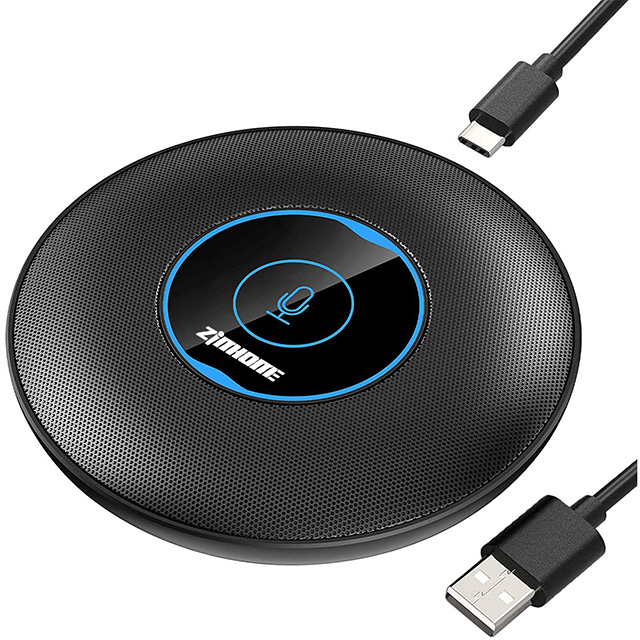
The ideal hardware depends entirely on your room size. A device meant for one person will struggle mightily in a boardroom. We must map the physical form factor directly to the surrounding environment. Failing to match these elements guarantees poor audio.
Your ideal setup includes a directional USB mic or a personal speakerphone. The primary goal is actively rejecting background noise. You want to block out typing sounds, street traffic, and barking pets. This keeps the speaker's voice upfront and crystal clear. You do not need 360-degree coverage here.
Small groups require a totally different approach. The ideal setup relies on low-profile, omnidirectional boundary mics. All-in-one speakerphones placed firmly at the center of the table also work beautifully. Your goal is an equal pickup radius for a tight group. You also want to avoid visual clutter and messy wires on the table.
Large rooms present highly complex acoustic challenges. The ideal setup involves scalable, modular USB systems. You need reliable daisy-chain capabilities or advanced multi-mic arrays. The goal is consistent voice pickup across a very long table. This setup deliberately minimizes the annoying "far away" echo effect often heard in large spaces.
Space Type | Ideal Setup | Primary Acoustic Goal |
|---|---|---|
Solo Desk | Directional USB mic / personal speakerphone | Reject background noise; isolate single voice |
Huddle Room | Omnidirectional boundary mic / central speakerphone | Provide equal pickup radius for a tight group |
Large Boardroom | Multi-mic arrays / daisy-chained systems | Maintain consistent volume across a long table |
Audio data sheets often confuse well-meaning buyers. We really need to filter out the marketing noise. Only a few specific specifications actually impact your daily call quality. Let us translate these technical terms into practical, actionable insights.
The polar pattern dictates exactly where the capsule listens.
Omnidirectional: This pattern provides full 360-degree pickup. It is absolutely essential for round tables where everyone speaks interchangeably.
Cardioid/Directional: This pattern has a 180-degree or much narrower pickup range. It remains the absolute best choice for single presenters facing a screen.
Beamforming Arrays: This advanced tech actively steers the listening focus. It locks onto the person currently speaking and ignores all background chatter.
Software filters often struggle handling sudden, unpredictable loud noises. Hardware-level background noise suppression works much faster and more reliably. Auto Gain Control (AGC) ensures quiet talkers are amplified automatically. It also lowers the volume of incredibly loud speakers. This built-in processing is vastly superior to software-only filters. A high-quality USB Conference Microphone relies heavily on robust internal DSP.
A flat, full-spectrum response sounds great for recording acoustic music. However, it actively harms speech intelligibility during corporate meetings. A voice-optimized frequency range is much better. It cuts out ultra-low rumbles like passing trucks or HVAC hums. It also removes piercing, distracting highs. This keeps human voices sounding incredibly natural and highly distinct.
Deploying new hardware at scale requires serious IT oversight. You cannot simply plug devices in and hope they work flawlessly. True plug-and-play operation requires careful, strategic planning.
A generic connection is simply not enough for professionals. You really want devices explicitly Certified for Microsoft Teams or Zoom Certified. Certification guarantees seamless mute synchronization across the physical hardware and the software application. It also ensures reliable firmware updates directly through the platform's administrative portal.
Growing room layouts inevitably demand flexible hardware. You must routinely connect multiple devices to a single host PC. Daisy-chaining allows you to link separate units together cleanly. This expands the effective pickup zone without introducing any noticeable latency or echo.
Modern environments demand rigorous network security. IT teams desperately need secure remote device management tools. They must handle firmware patching effortlessly across hundreds of deployed units. Secure hardware protocols actively protect the entire network from unauthorized physical tampering.
Untreated rooms present severe physical risks to audio quality. Structural noise, like people tapping on table vibrations, ruins important calls. You seamlessly mitigate this using rubber shock mounts or specialized heavy boundary designs. Managing cable trip hazards is also incredibly crucial for workplace safety.
Choosing the final hardware requires methodical, rigorous evaluation. Never buy units based purely on aesthetic design or brand recognition. Follow these exact steps to narrow down your top choices effectively.
Always map the device strictly to the room size. Consider the typical participant count for that specific collaborative space. Do not buy a massive boardroom device for a small, two-person huddle space. Match the hardware completely to the human workflow.
Highly reverberant rooms feature glass walls and hard floors. These empty spaces reflect sound constantly, creating auditory chaos. Prioritize dynamic hardware or strong beamforming arrays here. Highly sensitive studio condensers will capture far too much room echo.
Never rely on direct-to-hard-drive local voice recordings. They simply do not represent actual remote call quality. Buyers must evaluate audio samples directly over their actual UC platform. Listen closely to how Teams or Zoom digitally compresses the hardware signal.
Mission-critical rooms cannot ever stay offline for weeks. Assess the manufacturer's official Service Level Agreement carefully. Look deeply into their dedicated enterprise support offerings. Verify their exact hardware replacement policies before signing any final purchase order.
Your perfect audio setup goes far beyond a flashy spec sheet. The most effective devices align completely with your acoustic environment and IT infrastructure. Keep these core principles in mind:
Prioritize digital signal processing and built-in echo cancellation over studio-level sample rates.
Match the hardware's polar pattern directly to your table layout and seating arrangement.
Verify unified communications certifications to guarantee seamless software synchronization.
Protect your deployment by evaluating physical mounting options and cable limitations.
Take action today by auditing your existing meeting spaces. Measure the physical dimensions and identify areas suffering from severe echo. Define the exact voice pickup radius you need for each table. Finally, request demo units from manufacturers and test them inside your most challenging rooms.
A: Standard podcast mics use a cardioid polar pattern. They are designed to capture a single voice directly in front of the capsule. They lack the 360-degree pickup required for group discussions. If multiple people sit around a table, those off-axis will sound muffled or entirely inaudible. You need dedicated conferencing hardware instead.
A: A speakerphone is an all-in-one device. It includes both a microphone array and a built-in speaker. It also features internal Acoustic Echo Cancellation (AEC) to prevent feedback. A standalone mic only captures audio. If you use a standalone unit, you must route your audio output through separate room speakers and manage echo independently.
A: Passive USB cables have a strict physical limit. They generally max out at 15 feet (about 5 meters). Beyond this length, you risk data loss, dropouts, and connection failures. For larger rooms, you must use active USB extenders, powered hubs, or network-based extensions to maintain a reliable signal.
A: Most modern devices are true Class-Compliant. This means they operate flawlessly using native audio drivers built into Windows and macOS. You get immediate plug-and-play functionality. However, some advanced models offer optional software. These companion apps unlock extra features like custom equalizer settings, firmware updates, and detailed beamforming controls.


