
Views: 0 Author: Site Editor Publish Time: 2026-06-17 Origin: Site


Nothing ruins an intense gaming session quite like poor team communication. Your friends constantly complain about harsh background keyboard clatter ruining the voice channel. These limitations highlight the severe constraints of default audio setups. Built-in headset audio certainly offers unmatched convenience for everyday play. However, competitive matches and serious content creation demand pristine vocal clarity. Furthermore, modern audiophile desk setups completely omit integrated communication tools. We will establish a transparent baseline for evaluating your current audio gear. You will discover exactly when upgrading to a dedicated Gaming Microphone represents a necessary improvement. This guide helps you distinguish between vital equipment upgrades and unnecessary desk accessories.
A dedicated gaming microphone is essential when using audiophile headphones without built-in mics, or when content creation (streaming/recording) is a priority.
Plug-and-play USB microphones offer sufficient quality for 90% of gamers; XLR setups provide scalability but require additional hardware investments.
Upgrading a microphone will not bypass poor room acoustics or mechanical keyboard noise without proper positioning (boom arms) and cardioid polar patterns.
High-end gaming microphones bridge the gap for remote work and casual podcasting, though they may lack the flat frequency response required for professional music production.
Most gamers start their journey relying on integrated headset microphones. Manufacturers prioritize compactness over audio fidelity. They design inline and boom-arm headset mics utilizing tiny electret capsules. These small capsules physically limit the frequency response. They struggle to capture the rich low-end of human voices. Instead, they produce a thin, nasal sound profile. Headset firmware also applies harsh compression. This compression aggressively cuts off background noise. Unfortunately, it heavily distorts your natural speaking voice simultaneously.
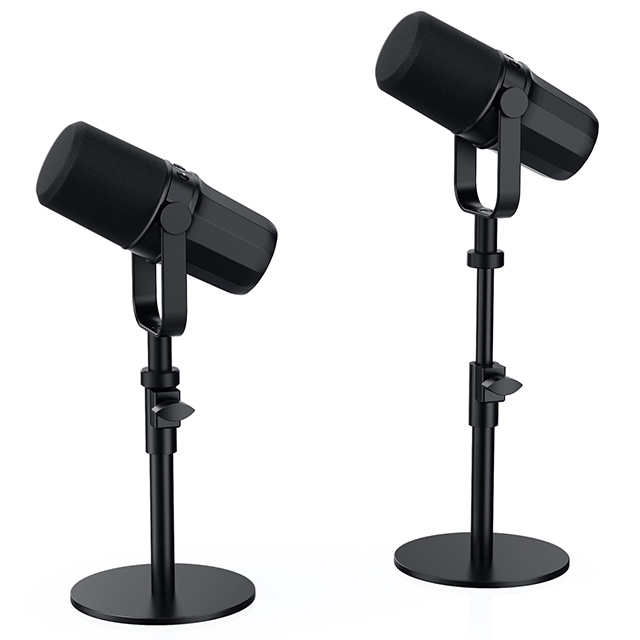
A standalone Gaming Microphone solves these physical bottlenecks entirely. Desktop units utilize significantly larger dynamic or condenser capsules. A larger capsule surface area captures fuller vocal resonance. Your voice sounds warmer, clearer, and far more natural. Standalone units also handle plosives much better. Plosives are the harsh bursts of air from "P" and "B" sounds. Headset mics clip and distort under these pressure spikes. Quality desktop microphones absorb these impacts gracefully.
We see a massive shift toward audiophile gaming setups today. High-fidelity studio headphones deliver incredible spatial audio precision. You can hear enemy footsteps clearly across the map. However, studio headphones completely lack integrated microphones. This omission forces players to find external solutions. Pairing premium studio headphones alongside a dedicated desktop microphone creates the ultimate audio-visual experience. You achieve studio-grade listening without sacrificing your team communication capabilities.
Feature | Headset Microphone | Standalone Gaming Microphone |
|---|---|---|
Capsule Size | Extremely small (often under 6mm) | Large (typically 14mm to 25mm+) |
Vocal Resonance | Thin, highly compressed | Full-bodied, natural warmth |
Plosive Handling | Poor (frequent clipping) | Excellent (often includes internal pop filters) |
Upgradability | Tied to the headset lifespan | Independent, highly modular |
Before buying new hardware, you must assess your current audio state honestly. A high-quality wireless gaming headset remains perfectly adequate for many scenarios. Casual players need simple functionality. Solo gamers rarely utilize voice channels anyway. Strictly party-chat gaming among close friends tolerates lower audio fidelity well. If your squad understands you clearly, you might not require an upgrade immediately. You save desk space avoiding extra gear.
However, specific usage scenarios trigger an absolute need for better equipment. We identify three distinct user profiles demanding elevated audio quality. If you fit into any of these categories, an upgrade becomes a measurable success criterion.
The Content Creator: Streaming on Twitch or uploading to YouTube requires professional polish. Viewers tolerate sub-par video quality occasionally. They almost never forgive terrible audio. Poor audio directly correlates to massive viewer drop-off rates. Crystal clear voice capture keeps your audience engaged longer.
The Competitive Player: Tactical shooters demand precise, latency-free comms. Callouts must cut through chaotic game audio instantly. Background noise bleed distracts your teammates. A dedicated setup ensures your voice isolates perfectly from frantic mechanical keyboard clicking.
The Hybrid User: Many gamers double their setup for professional duties. You might work from home participating in daily video conferences. You might even host an amateur podcast. A reliable desktop microphone ensures you sound professional across all corporate and creative applications.
Choosing your connection type dictates your entire setup complexity. USB microphones focus heavily on out-of-the-box readiness. You simply plug the cable directly into your computer. The internal hardware handles all analog-to-digital conversion natively. USB units feature built-in digital signal processing (DSP). This processing automatically cleans your audio without external software. A USB Gaming Microphone demands a much lower initial investment. It offers an immediate return on your audio quality.
XLR configurations represent the traditional studio standard. They provide unmatched scalability and modularity over time. You can swap individual components whenever necessary. However, XLR microphones cannot connect directly to your motherboard. You must purchase a separate audio interface. This interface converts the analog XLR signal into digital data. The interface requirement introduces notable hidden costs. Setting up an XLR ecosystem requires more cables and greater technical troubleshooting.
Polar patterns determine exactly how a microphone listens to the surrounding room. The cardioid polar pattern stands as the absolute non-negotiable standard for gamers. Cardioid specifically captures audio directly in front of the capsule. It actively rejects sounds originating from the rear. This front-focused design effectively ignores monitor reflections. It also dramatically reduces noisy mechanical keyboard switches echoing from behind the desk.
Many brands market multiple polar patterns as premium features. They advertise omnidirectional or bidirectional modes extensively. Omnidirectional modes capture sound from all 360 degrees equally. Bidirectional modes record from the front and back simultaneously. You must demystify these marketing terms. These extra modes rarely provide any useful function in gaming environments. They simply invite unwanted room noise into your voice channel.
Capsule technology drastically changes how your voice gets recorded. Condenser capsules offer extremely high sensitivity. They capture beautiful, subtle vocal nuances effortlessly. Broadcasters love their rich, detailed sound profile. Unfortunately, this high sensitivity acts as a double-edged sword. Condensers are heavily susceptible to untreated room echo. They eagerly pick up aggressive PC fan noise across the room.
Dynamic capsules operate on entirely different electromagnetic principles. They feature naturally lower sensitivity overall. You must speak much closer to a dynamic capsule. This physical requirement creates a massive advantage for gamers. Dynamic models naturally reject distant background noise beautifully. They excel in busy households containing barking dogs or loud roommates.
Specification | Condenser Capsules | Dynamic Capsules |
|---|---|---|
Sensitivity | Very High | Low to Moderate |
Room Noise Rejection | Poor (picks up background noise) | Excellent (isolates close sound sources) |
Ideal Environment | Treated, quiet studio spaces | Untreated bedrooms, noisy households |
Speaking Distance | Flexible (can sit further back) | Requires proximity (1-3 inches away) |
Many users buy expensive hardware expecting magical results instantly. We must address the harsh room acoustics reality immediately. Expensive hardware never cures a bad acoustic environment. Placing a premium microphone in an empty room guarantees terrible echo. Hardwood floors and bare walls reflect sound waves continuously. You must understand the necessity of proper gain staging. Keeping your microphone gain low prevents the capsule from capturing distant room reflections.
Desk space and physical ergonomics present another major hurdle. A desktop stand occupies valuable mousepad real estate. Furthermore, standard desktop stands pick up desk vibrations easily. Every time you strike a keyboard key, a low rumble travels up the stand. A dedicated boom arm and shock mount solve these physical issues. However, they represent often-overlooked requirements for optimal performance. Boom arms float the equipment above your desk. Shock mounts isolate the capsule from mechanical vibrations entirely.
Common Mistakes to Avoid:
Placing the microphone directly next to your PC exhaust fans.
Setting software gain to maximum instead of speaking closer to the capsule.
Typing heavily while resting your arms on the same desk supporting the mic stand.
Finally, watch out for software bloatware. Many manufacturers bundle proprietary companion software. This software frequently causes severe audio driver conflicts. It consumes unnecessary CPU overhead while gaming. We recommend prioritizing hardware featuring on-board controls. A physical gain dial allows instant volume adjustments mid-game. A tactile mute button guarantees privacy without tabbing out of your full-screen application.
Evaluating your options requires a structured approach. First, you must define your expected lifespan and quality tier. Entry-level models provide massive upgrades over headset mics without complicated setups. Mid-tier options introduce better capsules, sturdier build materials, and enhanced noise rejection. Prosumer tiers target dedicated streamers needing flawless vocal reproduction. You decide which tier matches your long-term creative ambitions.
Next, evaluate your hardware compatibility strictly. Confirm your ecosystem constraints before making any decisions. PC users enjoy universal compatibility across almost all brands. Console players face a much stricter reality. PlayStation 5 and Xbox consoles implement restrictive USB audio protocols. Many popular USB models possess severe console limitations. Always verify console certification if you plan on cross-platform usage.
Follow these actionable next steps before finalizing your purchase:
Audit your current desk space: Measure your desk lip thickness. Ensure a standard boom arm clamp fits securely behind your monitors.
Test your room's natural echo: Clap your hands loudly in the center of your room. If you hear a ringing echo, strongly favor a dynamic capsule over a condenser.
Analyze your ambient noise: Take note of your PC fan volume under heavy gaming loads. Choose your polar pattern strictly based on this ambient noise level.
We established that a dedicated gaming microphone represents a serious investment in communication reliability. It elevates your content quality drastically. Default headsets simply cannot process audio with the depth required for modern streaming or competitive play. Expanding your desk setup introduces new ergonomic considerations, but the vocal clarity payoff remains immense.
Consider your final verdict carefully. Upgrade immediately if your current setup bottlenecks your team communication. Take the leap if poor audio limits your streaming potential. Finally, invest in a dedicated unit if you want to experience the incredible fidelity of high-end studio headphones without losing your voice channel. Take control of your acoustic environment, practice proper gain staging, and enjoy the pristine communication you deserve.
A: You can use them for casual vocal tracking perfectly fine. However, gaming mics often utilize tuned frequency curves. They artificially boost mid-range frequencies specifically for voice clarity. This tuning alters the natural sound of acoustic instruments drastically compared to flat-response studio mics. Professional music production requires completely neutral frequency captures.
A: You must utilize a cardioid polar pattern exclusively. Keep the capsule positioned strictly in front of your keyboard, mounted on an articulating boom arm. Lower your physical gain dial and speak directly into the grill. Additionally, utilize software noise gates like NVIDIA Broadcast or Discord's Krisp for AI-driven noise removal.
A: XLR setups offer a much higher technical ceiling. They provide zero-latency hardware monitoring and modular upgrade paths. However, modern high-end USB mics provide indistinguishable audio quality for standard game lobbies and streaming platforms. USB models deliver exceptional plug-and-play performance without requiring an external audio interface.


